
Ludo333 Game APK Download 2026 (Free) | Features, Bonus & Guide
ludo333.xyz

Description
Mobile gaming has become a daily habit for thousands of Android users across Pakistan, especially people who enjoy short gaming sessions during evening breaks, commutes, or free weekends. Whenever a fresh title starts circulating in social groups and gaming communities, players naturally look for a clear overview of Ludo333 Game before downloading anything onto their smartphone. Real players want honest details about how the interface looks, what categories are available on the main screen, how promotions and mission tabs are organized, and what precautions matter before creating an account.
In this complete guide, we walk through Ludo333 Game from a practical user perspective so you know exactly what to expect on an Android device. We cover the home screen layout, featured game sections, daily mission milestones, safe installation habits, account security, and responsible play guidelines for users in Pakistan. If you also enjoy comparing similar gaming apps on Newapks.pk, you can explore our guides on M333 Apk and 92 PSL Game to see how different mobile platforms structure their menus and features.
What Is Ludo333 Game?
Ludo333 Game is an Android-oriented mobile gaming platform designed with a deep navy and purple visual theme, bringing quick navigation buttons, category shortcuts, promotional banners, and profile controls together on a single screen. Although the name starts with Ludo, the platform layout extends beyond a single board mode and highlights fast-paced arcade titles, crash-style multiplier games, slot reels, mini games, and card sections.
For many mobile users in Pakistan, having several entertainment formats inside one lightweight interface feels convenient because they do not need to install separate apps for every category. At the same time, mobile gaming platforms regularly update their banners, active events, and game lists, which means treating the home screen as an overview rather than a permanent guarantee is always the smartest approach. Checking rules inside each section helps users make informed choices before spending time or money.
Ludo333 Game Interface and Home Screen Layout
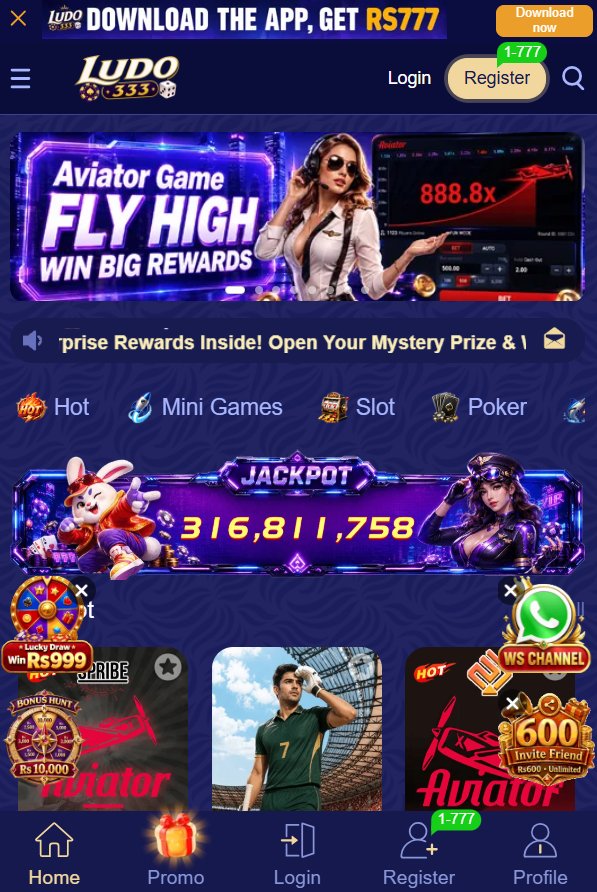
First impressions on a mobile screen play a huge role in how comfortable an app feels to use. When icons are cramped or menus hide basic actions behind multiple taps, players quickly lose interest. Ludo333 Game uses a dark navy background paired with gold, white, and purple highlights so that buttons, game cards, and text remain easy to read on vertical smartphone displays.
Top Header and Account Access
At the very top of the interface, users see an app download bar with a bright orange Download Now button on the right side, followed directly by the Ludo333 Game emblem, a side menu drawer icon, Login and Register buttons, and a search icon. Placing login, registration, and search controls right at the top allows both new visitors and returning users to reach their destination without scrolling through promotional clutter.
Featured Banners, Categories, and Jackpot Strip
Directly underneath the header sits a large featured banner promoting Aviator alongside a jackpot counter strip and horizontal category tabs labeled Hot, Mini Games, Slot, and Poker. Below these category tabs, individual game thumbnails and floating quick-action shortcuts appear across the lower half of the screen. While promotional graphics display large numbers and bright visuals to catch attention, users should always read the actual terms inside each section rather than assuming every banner represents guaranteed rewards.
Bottom Navigation Menu
A fixed bottom navigation bar keeps five essential destinations within easy thumb reach at all times: Home, Promo, Login, Register, and Profile. On standard mid-range and budget Android phones, having a persistent bottom bar makes switching between games, promotions, and account settings smooth and predictable.
Main Game Categories Available on Ludo333 Game
Variety is one of the main reasons mobile players explore multi-category gaming platforms instead of single-mode apps. Rather than forcing every visitor into one format, Ludo333 Game organizes its library under clear category headings so players can browse according to their mood and available time.
- Hot Games: Displays featured and trending titles such as Aviator-style crash games and popular thumbnails that attract quick rounds and high user activity.
- Mini Games: Focuses on shorter, fast-loading casual formats suited for players who only have a few minutes to spare during a break.
- Slot Games: Brings together reel-based and symbol-driven slot titles where outcomes depend on random chance and individual game rules.
- Poker and Card Modes: Offers a dedicated tab for card-style games and table formats for users who prefer familiar card layouts.
Every game listed under these categories follows its own pace, stake rules, and risk level. Before jumping into any round, taking a moment to open the information icon or rules panel inside the game helps you understand how scoring, multipliers, or stakes work.
Promotions, Daily Missions, and Referral Tasks
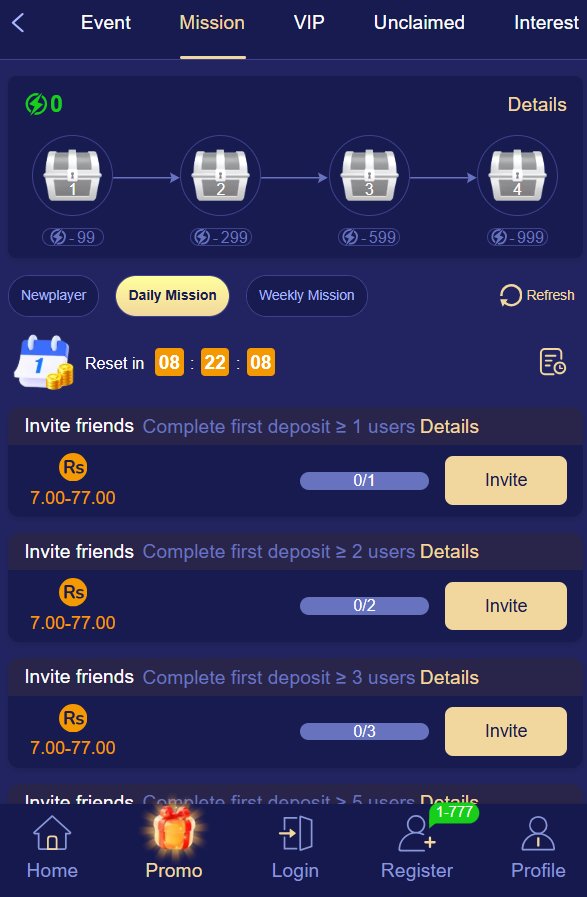
Many users tap the Promo icon in the bottom bar right after opening Ludo333 Game to see what events, mission chests, or referral offers are currently running. The promotions section organizes multiple sub-tabs including Event, Mission, VIP, Unclaimed, and Interest so users can review active tasks in a clean layout.
Daily and Weekly Mission Chests
Inside the Mission tab, users can switch between Newplayer, Daily Mission, and Weekly Mission views, accompanied by a live countdown timer showing when the current mission cycle resets. Above the task list sits a row of four milestone chests marked with point thresholds, giving active accounts a clear visual indicator of their progress toward each tier.
Friend Invite Milestones and Conditions
Below the chest bar, referral tasks list progressive invite targets such as inviting friends who complete a qualifying first deposit, paired with progress counters and a direct Invite button. Whenever an event or invite task mentions deposit requirements or bonus credits, reading the attached Details link carefully ensures you understand eligibility conditions and any withdrawal rules before participating.
VIP, Unclaimed, and Interest Sections
Additional tabs such as VIP, Unclaimed, and Interest keep loyalty tiers, pending rewards, and account perks separated from regular gameplay. Keeping in mind that bonus balances and withdrawable funds often carry different terms prevents confusion when reviewing your wallet.
How to Download and Install Ludo333 Game APK on Android
Because Android APK packages are installed outside the standard Google Play Store flow, following careful installation steps keeps both your device and personal data protected. Taking two extra minutes to verify the file source prevents common security mistakes.
- Verify the Download Source: Always obtain the Ludo333 Game APK file from a trustworthy source and check the version details before starting the download.
- Confirm Storage and Internet Stability: Ensure your Android smartphone has sufficient free internal storage and a steady Wi-Fi or mobile data connection so the package downloads completely without file corruption.
- Review Android Install Permissions: When your phone prompts you to allow app installation from your browser or file manager, enable it only for that verified file and pay attention to any system security alerts.
- Open and Check App Permissions: Launch Ludo333 Game after installation completes, review its interface and terms carefully, and avoid granting unnecessary device permissions that do not relate to normal gameplay.
Compatibility for PC and iPhone Users
APK files are built specifically for the Android operating system, so they do not run natively on iPhones or Windows computers without dedicated browser access or official platform support. If you use iOS or a desktop browser, avoid downloading unofficial installers or unknown configuration profiles from random links and stick strictly to verified web access where available.
Android System Requirements and Smooth Performance Tips
Mobile users in Pakistan run apps on a wide range of smartphones, from entry-level 3GB RAM devices to newer mid-range phones. Animated banners, live counters, and slot graphics can consume extra memory if background apps are left open.
| Requirement | Recommended Check for Smooth Performance |
|---|---|
| Android Version | Android 5.0 or newer is recommended so modern web views and security protocols work properly. |
| RAM and Memory | At least 3GB RAM with background apps closed helps prevent lag during animated game rounds. |
| Free Storage | Keep at least 200MB to 500MB of free space for the APK file, updates, and temporary cache. |
| Internet Connection | Stable 4G mobile data or home Wi-Fi reduces loading delays and session timeouts. |
| Device Security | Keep Google Play Protect active and avoid modified or tampered APK files from unknown senders. |
Registration, Login, and Account Safety Practices
Quick Login and Register buttons on the Ludo333 Game interface make creating or accessing an account simple, yet strong security habits remain essential for every user. Fake lookalike websites and unauthorized agents frequently target popular gaming names to steal login credentials.
- Double Check the App or Web Address: Always confirm you are inside the authentic Ludo333 Game interface before typing your mobile number, username, or password.
- Use a Unique Strong Password: Create a password used only for gaming rather than reusing the same password from your personal email, Easypaisa, JazzCash, or banking apps.
- Never Share One-Time Codes: Keep verification codes and passwords strictly private, even if someone online claims to offer free VIP upgrades or account recovery help.
- Rely on Official Support Channels: If you forget your password or face a login error, use built-in account recovery options rather than handing your details to third parties.
Payment Methods and Financial Caution in Pakistan
Whenever a mobile gaming app includes deposit buttons, mission tiers, or referral tasks, Pakistani players naturally ask whether familiar local wallets such as JazzCash, Easypaisa, or bank transfers are supported. Because payment gateways, minimum limits, and processing times on third-party platforms can change without advance notice, always verify active payment methods directly inside your logged-in account section.
Never transfer money to unverified personal mobile numbers or follow payment instructions shared in unofficial WhatsApp or Telegram groups. If you ever choose to use paid features on any gaming platform, read all withdrawal rules first and only use spare entertainment money that you can afford to lose without affecting daily responsibilities.
Common Ludo333 Game Issues and Practical Fixes
Even smoothly designed mobile platforms occasionally face network hiccups or device conflicts. If you encounter an issue while installing or browsing Ludo333 Game, working through a few basic checks usually resolves the problem quickly.
APK File Fails to Install
When an APK refuses to install, first check available storage space on your phone and confirm that the download reached 100 percent without interruption. If an older version is already installed on your device, uninstalling the outdated build before installing the fresh file often clears signature conflicts.
Slow Loading or Stuck Home Screen
If banners or game thumbnails take too long to appear, switch between Wi-Fi and mobile data to test your connection stability. Clearing temporary cache from your phone settings or restarting the app refreshes stuck sessions.
Mission Progress or Rewards Not Updating
On the Mission screen, check the countdown reset timer and read the exact task requirement to confirm whether a qualifying step is still pending. Refreshing the page or contacting official support with clear details helps resolve genuine sync delays.
Responsible Gaming Guidelines and Legal Note
Mobile games should remain an enjoyable pastime rather than a source of financial stress. Real-money gaming and chance-based games carry genuine financial risk, and online gambling or betting faces strict legal restrictions across Pakistan. Users should always check local laws that apply in their area and ensure any adult gaming platform is accessed strictly by individuals aged 18 and older where permitted.
Never treat gaming apps as a dependable income source or a solution to financial problems. Decide on a strict time limit and a firm budget before opening any game, never borrow money or chase losses after an unlucky session, and step away immediately if gaming begins to interfere with your work, studies, sleep, or family life.
Frequently Asked Questions About Ludo333 Game
What is Ludo333 Game?
Ludo333 Game is an Android-focused mobile gaming platform featuring a navy and purple interface with category tabs for Hot games, Mini Games, Slot titles, and Poker, alongside daily mission and promotional sections.
Is Ludo333 Game free to download on Android?
Yes, downloading the Ludo333 Game APK installation file is free for Android users, while any optional in-app deposits, missions, or promotional offers follow the platform’s own terms and conditions.
What features appear on the Ludo333 Game home screen?
The home screen includes a top download strip, Login and Register shortcuts, featured banners like Aviator, a jackpot display, category tabs such as Hot, Mini Games, Slot, and Poker, and a bottom navigation bar.
How do Daily Missions and invite rewards work in Ludo333 Game?
Inside the Promo tab, the Mission section tracks Newplayer, Daily Mission, and Weekly Mission tasks toward four milestone chests, alongside friend invite tiers that include a countdown reset timer and specific eligibility rules.
Does Ludo333 Game support JazzCash or Easypaisa in Pakistan?
Available payment methods and transaction limits can vary over time, so users in Pakistan should always verify currently supported deposit and withdrawal options directly inside their verified account menu.
Is Ludo333 Game safe and legal to use in Pakistan?
Users should verify trusted download sources, protect their login credentials, understand the financial risks of chance-based games, and keep in mind that real-money gambling faces strict legal restrictions in Pakistan.
Final Verdict
Ludo333 Game combines a clean navy-and-gold mobile layout, easily reachable category tabs, and structured daily mission screens that make browsing straightforward on Android devices. Whether you are checking out its interface for the first time or comparing mobile gaming guides on Newapks.pk, always download from trusted sources, read promotional rules carefully, protect your account details, and keep your gaming habits balanced and responsible.
Download links
How to install Ludo333 Game APK Download 2026 (Free) | Features, Bonus & Guide APK?
1. Tap the downloaded Ludo333 Game APK Download 2026 (Free) | Features, Bonus & Guide APK file.
2. Touch install.
3. Follow the steps on the screen.