
92 PSL Game Apk Download | Explore Best Exciting New Game

Description
Mobile applications have changed the way people explore digital entertainment. Today, users can find different categories, game interfaces, account features, and promotional sections through smartphone applications. However, before installing a new APK, it is important to understand its interface, available features, registration process, installation requirements, and security considerations.
This guide explains 92 PSL Game Apk in simple English. It covers the platform overview, interface, features, account registration, login procedure, download and installation instructions, frequently asked questions, and important precautions for users who want to explore the application.
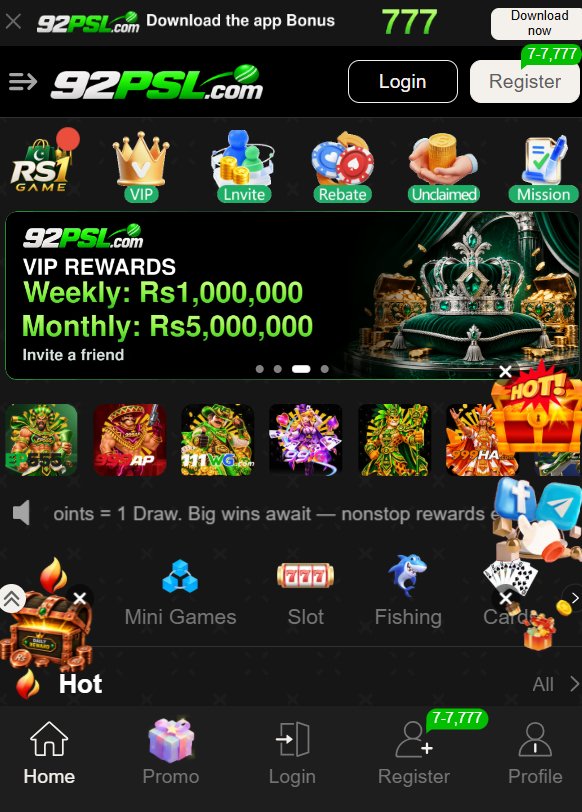
App Name: 92 PSL Game Apk
Category: Mobile Gaming and Entertainment
Platform: Android
App Format: APK
Theme: Cricket-Inspired Branding
Interface: Mobile-Friendly Design
What Is 92 PSL Game Apk?
92 PSL Game Apk is a mobile application associated with cricket-inspired gaming and online entertainment. Its branding uses cricket-related visual elements, including a green cricket ball and a sports-style logo. This design makes the application recognizable to visitors who are interested in cricket-themed mobile platforms.
The application is presented through an Android APK format. APK files are installation packages used by Android devices to install applications outside or alongside the traditional app distribution process. Users who download an APK should always check the source and make sure that the file is genuine before installing it.
Like many mobile gaming platforms, the application may include different menus, account options, game-related sections, and promotional features depending on the version available to users. The actual interface and features can change over time, so the information displayed inside the current application should always be considered the most relevant.
92 PSL Game Apk should not be confused with the official Pakistan Super League cricket competition, its teams, players, or official broadcasting services unless the application clearly establishes such an association. A cricket-inspired name or logo alone does not confirm an official relationship with any cricket organization.
92 PSL Game Apk Overview
The first thing users usually notice about a mobile gaming application is its visual design. A recognizable logo, organized menus, readable text, and a responsive layout can make an application easier to navigate. The 92 PSL branding uses green and dark tones with a cricket ball symbol, creating a sports-inspired visual identity.
Users generally expect a gaming platform to provide straightforward navigation so they can locate account options, explore available games, and understand the different sections. A mobile-friendly layout is especially important because most visitors may access the application using an Android smartphone rather than a desktop computer.
Before using the application, visitors should explore the homepage and read any information displayed about the available services. It is also important to understand whether a particular feature requires account registration, verification, a deposit, or other conditions.
Cricket-Inspired Branding
The application’s logo is one of its noticeable visual elements. It uses a green cricket ball with a silver ring-style design and the 92PSL.com branding. The cricket theme makes the logo stand out from many ordinary gaming application icons.
Sports-inspired branding can help users recognize a platform quickly. However, the logo itself does not tell users everything about the application’s services, security, or authenticity. Users should check the application information independently rather than making decisions based only on its design.
Mobile Application Format
Android APK applications are commonly distributed as installation files. This format can allow users to install applications manually when a compatible package is available. Manual installation requires additional attention because the file may come from a website rather than an official application store.
Users should verify the application name, file details, compatibility, and download source. Avoid installing modified packages from unknown websites because they may contain unwanted software or harmful code.
Features of 92 PSL Game Apk
Features can vary according to the version of an application and the services currently available. The following sections explain the types of features users may encounter while exploring a mobile gaming platform and what they should check before using them.
Easy-to-Recognize Interface
The cricket-themed logo helps establish a recognizable identity. A clear interface can make it easier for users to understand where to find the different menus. When opening the application for the first time, users should take a few moments to review the homepage instead of immediately selecting unfamiliar options.
Pay attention to the navigation labels, account section, game categories, promotional information, and any help or support options. Understanding the interface before using the application can reduce confusion later.
Mobile-Friendly Navigation
Smartphone applications need menus that are comfortable to use on smaller screens. Buttons should be easy to identify, text should remain readable, and important options should not be hidden behind unnecessary menus.
A mobile-friendly application can make it easier to move between different sections without repeatedly returning to the homepage. If a particular screen appears broken or difficult to use, check whether an updated compatible version is available through a trusted source.
Gaming and Entertainment Sections
Gaming applications may organize their entertainment options into separate categories. These categories help visitors understand what types of games are available and choose the section they want to explore.
Users should read the rules of individual games before playing. Some entertainment options may involve luck, while others may have different mechanics or requirements. Do not assume that every game works in the same way simply because it appears inside the same application.
Account Registration Options
Some mobile gaming platforms provide account registration to access their services. A registration page may request information such as a mobile number, username, password, or verification code. The exact fields depend on the application.
Before creating an account, check what information is being requested and whether the application explains how that information is used. Avoid providing unnecessary personal details, and never use the same password that you use for your email, banking, or other important accounts.
Promotional Information
Gaming platforms may display promotional banners, announcements, activities, or rewards. These promotions can have specific conditions, eligibility requirements, time limits, or restrictions.
Always read the complete terms before participating. A promotional banner should not be treated as a guarantee of earnings or a promise that a particular result will occur. If the conditions are unclear, avoid participating until you understand them.
Account and Profile Management
An account section may allow users to view their account details or manage selected settings. Depending on the available features, the profile area may include information related to verification, password management, or account activity.
Users should protect their login information and keep their devices secure. If a profile menu includes sensitive options, carefully read the instructions before making changes.
Access Through Android Devices
The APK format is intended for Android installation. Users should check the application’s compatibility requirements before downloading it. Older Android versions may not support newer applications, while some devices may have security settings that prevent installation from outside sources.
Do not disable security protections permanently just to install an unfamiliar application. If the device warns that a file may be unsafe, take the warning seriously and verify the source before continuing.
How to Register on 92 PSL Game Apk
New users may need to register before accessing account-based features. The process depends on the current registration interface, but the general steps below explain how to approach account creation safely.
Step 1: Open the Application
Install the application only after checking the APK file and its source. Once installation is complete, open 92 PSL Game Apk from your device’s application menu and wait for the homepage to load properly.
Step 2: Find the Register Option
Look for the Register, Sign Up, or account creation option on the homepage. Tap it to open the registration screen. If the application does not display a registration option, check its menu or official instructions instead of using an unrelated website.
Step 3: Enter the Required Information
Review the registration form carefully. Enter only the information that is required and appropriate for account creation. If a mobile number is requested, make sure you understand how the platform will use it.
Create a strong password containing a combination of letters, numbers, and other permitted characters. A unique password is preferable because it reduces the risk of another compromised account affecting this one.
Step 4: Complete Verification
If the application provides a verification process, follow the instructions displayed on the screen. Verification may be used to confirm certain account details. Never share verification codes with another person, even if they claim to be an application representative.
Step 5: Review the Account
After completing registration, review your account information and any available settings. Read the platform’s terms, privacy information, and restrictions before using additional features.
Important: Do not create an account if the application asks for unnecessary sensitive information or if you cannot verify that the registration page belongs to the platform you intended to access.
How to Login to 92 PSL Game Apk
Existing users may be able to access their accounts through the login section. The process is usually simple, but the exact interface may differ depending on the version of the application.
- Open 92 PSL Game Apk on your Android device.
- Locate the Login option on the homepage.
- Enter the account information you registered with.
- Carefully check your username, mobile number, or password.
- Complete any verification process displayed on the screen.
- Continue only after the application confirms successful login.
If login fails, first check whether you have entered the correct information. Make sure your internet connection is working and the application is updated if a newer version is available from a trusted source.
If you have forgotten your password, use the official account recovery option if available. Avoid contacting unknown people who promise to recover accounts in exchange for money or sensitive information.
How to Download Game
Users who want to install 92 PSL Game Apk should first locate a reliable download source. Because APK files can be installed manually, it is important to verify the file before opening it. An unfamiliar download page should not automatically be considered trustworthy just because it uses the application’s name or logo.
Step 1: Find a Trusted Download Source
Search for the application’s download page and check that the page clearly identifies the app. Read the available information about the version, file size, Android compatibility, and installation requirements.
Avoid websites that redirect you through multiple suspicious pages, request unrelated downloads, or display misleading download buttons. The actual APK download should be clearly identified.
Step 2: Download the APK File
Once you have verified the source as much as possible, download the APK file to your Android device. Wait for the download to finish before opening the file. If the download is interrupted, check that the file is complete before attempting installation.
Step 3: Check the Downloaded File
Before installation, check the file name and ensure it matches the application you intended to download. If your device or security software reports a suspicious file, do not ignore the warning.
Whenever possible, use trusted security tools to scan downloaded files. A file name alone cannot confirm that an APK is safe or authentic.
Step 4: Allow Installation if Required
Android may display a permission prompt when you attempt to install an APK downloaded through a browser. Depending on your Android version, you may need to allow installation from that particular source.
Only grant this permission if you trust the file and its source. You do not need to disable all security settings on your phone to install an application.
Step 5: Install the Application
Tap the downloaded APK file and follow the installation instructions. Wait until Android completes the process. If the installation fails, check the device’s compatibility, available storage, and file integrity instead of downloading random modified versions.
Step 6: Open and Review Permissions
After installation, open the application and check any permission requests. Grant only permissions that are necessary for the features you intend to use. If an application requests access that does not appear relevant to its purpose, consider stopping the installation or removing the application.
Once the installation is complete, you can review the homepage and available menus to understand how the platform works.
Users interested in exploring another platform can also read our OXWIN Game guide for additional app information.
How to Use 92 PSL Game Apk
After opening the application, new users should begin by reviewing its interface. The best approach is to understand each menu before using account-based or other features. A few minutes of exploration can help you identify where the application displays instructions, settings, and support information.
Explore the Homepage
Start with the main homepage and review the available buttons. Look for game categories, promotional areas, profile options, and account-related menus. Do not immediately select unfamiliar features without reading their descriptions.
Understand the Game Rules
Every game may have its own rules and mechanics. If you decide to explore a particular game, read its instructions before starting. Pay attention to how rounds work, how results are determined, and whether the game involves any financial risk.
Check Available Account Settings
Review your profile and account settings. If the application provides password changes, verification, or other account security options, make sure you understand how they work.
Read Promotional Conditions
If you see an offer or promotion, review the complete terms. Some offers may have eligibility restrictions, specific requirements, or limitations. Do not make financial decisions based only on promotional messages or banners.
Use the Application Responsibly
Mobile entertainment should not interfere with your daily responsibilities, work, studies, family time, or financial commitments. If an application includes wagering or deposit-based games, remember that outcomes are uncertain and losses are possible.
92 PSL Game Apk User Experience
The experience of using a mobile gaming application depends on several factors, including its interface, loading speed, compatibility, navigation, and clarity of instructions. A visually attractive logo can make an application easier to recognize, but the actual experience depends on how the application performs on the user’s device.
Android users may have different screen sizes, operating system versions, and internet connections. As a result, the same application may work differently across different smartphones. Users should check compatibility information and avoid assuming that every feature will work identically on all devices.
Navigation and Accessibility
Clear navigation is useful for users who are unfamiliar with a platform. Menus should make it easy to find account settings, game information, and help sections. If a feature is difficult to understand, look for its instructions rather than guessing.
Loading and Connectivity
Some application features may require an internet connection. Loading problems can sometimes occur because of network issues, server availability, device performance, or application updates.
If a screen does not load correctly, check your internet connection and restart the application. Avoid installing unofficial fixes or modified versions simply to solve a temporary loading problem.
Device Compatibility
Compatibility depends on the APK’s requirements and your Android device. Before installation, check the available information about supported Android versions. Keeping your operating system updated can also help improve security and application compatibility when updates are supported by your device.
Advantages of 92 PSL Game Apk
There are several aspects users may appreciate when exploring a cricket-themed mobile gaming platform. These are general interface observations rather than guarantees about specific services or outcomes.
- Recognizable cricket branding: The green cricket ball logo gives the application a sports-inspired identity.
- Android APK format: The APK format allows manual installation on compatible Android devices when a suitable package is available.
- Mobile-oriented experience: Smartphone applications are designed to be accessed through mobile screens.
- Entertainment categories: A gaming platform may organize different entertainment options in separate sections.
- Account access: Registration and login options may provide access to account-based features.
- Distinctive visual identity: Its cricket-related logo and colors make the application visually recognizable.
- Convenient access: Users can open an installed application directly from their device without repeatedly searching for its webpage.
Things to Consider Before Installing
Before installing any third-party APK, users should consider the potential risks. Applications downloaded outside official stores may not have undergone the same checks or review processes. This does not automatically mean every APK is unsafe, but it makes verification more important.
- Verify the download website and application details.
- Do not install files from suspicious advertisements or unknown messages.
- Review application permissions carefully.
- Use a strong and unique password if registration is required.
- Protect your verification codes and account information.
- Read the platform’s privacy policy and terms of use.
- Do not assume that cricket branding indicates official PSL affiliation.
- Check whether the services are legally available in your location.
- Be careful with deposit requests, financial transactions, and promotional claims.
- Remove the application if it behaves suspiciously or requests unnecessary permissions.
Is 92 PSL Game Apk Safe?
Safety cannot be confirmed simply by looking at an application logo, website name, or promotional banner. The security of an APK depends on where it comes from, how it was created, the permissions it requests, and how it handles user information.
Users should independently verify the download source before installation. If a file is hosted on an unknown website, consider whether you can find reliable information about the application and its developer. Security tools may help identify suspicious files, but no single check can guarantee that an application is completely safe.
Protect your personal information by avoiding unnecessary permission requests. Do not provide banking details, passwords, or sensitive information unless you understand why the application requests them and have independently verified the service.
If the platform offers financial gaming or wagering services, users should understand the risks involved. Financial loss is possible, and no application should be treated as a guaranteed way to earn money.
Responsible Gaming and Important Advice
Gaming should remain a form of entertainment rather than a way to solve financial problems. If a platform includes wagering, deposits, or money-related activities, users should be particularly careful about their spending and decisions.
- Only participate if you meet the applicable legal age requirements.
- Check local laws before accessing wagering-related services.
- Never use borrowed money to participate in financial gaming.
- Do not chase previous losses.
- Set personal limits and stop if gaming becomes stressful.
- Never believe claims that a particular game guarantees profit.
- Keep your financial information private.
- Take breaks and avoid excessive screen time.
Responsible decisions are important for online safety and personal well-being. If an activity begins affecting your finances or daily life, take a break and seek appropriate support.
Explore More Games on Newapks.pk
If you are interested in exploring more mobile gaming guides, Newapks.pk provides information about different applications and their features. You can visit the following articles to learn more about other gaming platforms.
UP786 Game
Read our guide about UP786 Game to explore its application information, interface, registration details, and other available features.
M66 Game
You can also visit the M66 Game article to learn about another mobile gaming platform and review its available information before installation.
OXWIN Game
For another gaming platform guide, visit OXWIN Game and explore the details covered in its article.
Frequently Asked Questions
What is 92 PSL Game Apk?
92 PSL Game Apk is a mobile gaming application associated with cricket-themed branding and mobile entertainment. Users should check the current application details to understand its actual features and services.
Is 92 PSL Game Apk available for Android?
The application is presented in APK format for Android devices. Users should verify device compatibility and download the file only from a source they trust.
How can I download 92 PSL Game Apk?
Locate a trusted download source, verify the application information, download the APK file, and follow the Android installation instructions. Check the file for security concerns before installing it.
How do I register on 92 PSL Game Apk?
Open the application, locate the Register option, enter the required information, and complete any verification process displayed by the application.
How can I login to 92 PSL Game Apk?
Open the application and select Login. Enter your registered account details and follow any verification instructions if required.
Is 92 PSL Game Apk an official Pakistan Super League app?
The cricket-themed name and logo alone do not confirm official affiliation with the Pakistan Super League, its teams, or cricket organizations. Users should verify any official association independently.
Can I install 92 PSL Game Apk on every Android phone?
Compatibility depends on the application’s Android requirements and the device’s operating system. Check the supported Android version before downloading and installing the APK.
Why is 92 PSL Game Apk not installing?
Installation problems may occur because of an incompatible Android version, insufficient storage, a corrupted APK file, or device security restrictions. Check the file and device requirements before trying again.
Is 92 PSL Game Apk safe to use?
Safety depends on the APK source, application permissions, and its handling of user information. Verify the source, scan the file when possible, and avoid granting unnecessary permissions.
Does 92 PSL Game Apk guarantee earnings?
No mobile gaming application should be considered a guaranteed source of earnings. Games involving chance or wagering can result in financial losses. Users should understand the risks and make responsible decisions.
What should I do if I forget my password?
Use the official password recovery option if available. Avoid sharing your password or verification code with unknown people who offer account recovery services.
Can I use 92 PSL Game Apk without registration?
Access requirements depend on the application. Some sections may be available without an account, while other features may require registration or verification.
Final Words
92 PSL Game Apk is a cricket-themed mobile gaming platform with a recognizable green cricket ball logo and an Android application identity. Its sports-inspired branding may attract users who enjoy cricket-related digital entertainment and want to explore mobile gaming platforms.
Before downloading the APK, users should verify its source, check compatibility with their Android device, and carefully review any permission requests. Registration details, promotional conditions, and game rules should also be understood before using account-based features.
Always prioritize online security, protect your personal information, and make responsible decisions when exploring gaming applications. A careful approach can help you avoid unnecessary risks while learning about mobile entertainment platforms.
Download links
How to install 92 PSL Game Apk Download | Explore Best Exciting New Game APK?
1. Tap the downloaded 92 PSL Game Apk Download | Explore Best Exciting New Game APK file.
2. Touch install.
3. Follow the steps on the screen.